
Blog
September 2, 2026
Is Your Solar System Still Performing Like It Should?



Estimated read time: 6–7 minutes
TL;DR
- Your solar system does not have to stop completely before it deserves attention. Changes in production, monitoring, shade, or equipment behavior can be early signals.
- Use your monitoring history and prior production as a baseline. One unusual day is less important than a pattern that continues.
- Check what you can safely see from the ground or in your monitoring app, but leave electrical diagnosis and roof work to a qualified solar professional.
- If something looks different, document what changed and when. That information gives the installer a much better starting point for diagnosis.
- A system check can lead to a simple repair, a broader upgrade, or a repowering plan that keeps useful equipment while updating what no longer serves you.
You do not need to be a solar expert to notice when something changes
Most homeowners do not think about solar operations and maintenance (O&M) when the system is working. They see the panels on the roof, check an app occasionally, and expect the system to keep producing. That is reasonable. Solar is designed to be relatively low maintenance.
But low maintenance does not mean no attention at all. As a system gets older, small changes can be useful clues: a monitoring app stops reporting, an inverter starts showing an alert, a tree begins shading part of the roof, or production seems lower than it used to be. The goal is not to diagnose the system yourself. It is to recognize when something has changed and know when it is time to bring in a professional.
A simple mindset:
Notice the change. Gather the evidence. Let a qualified professional diagnose the cause.
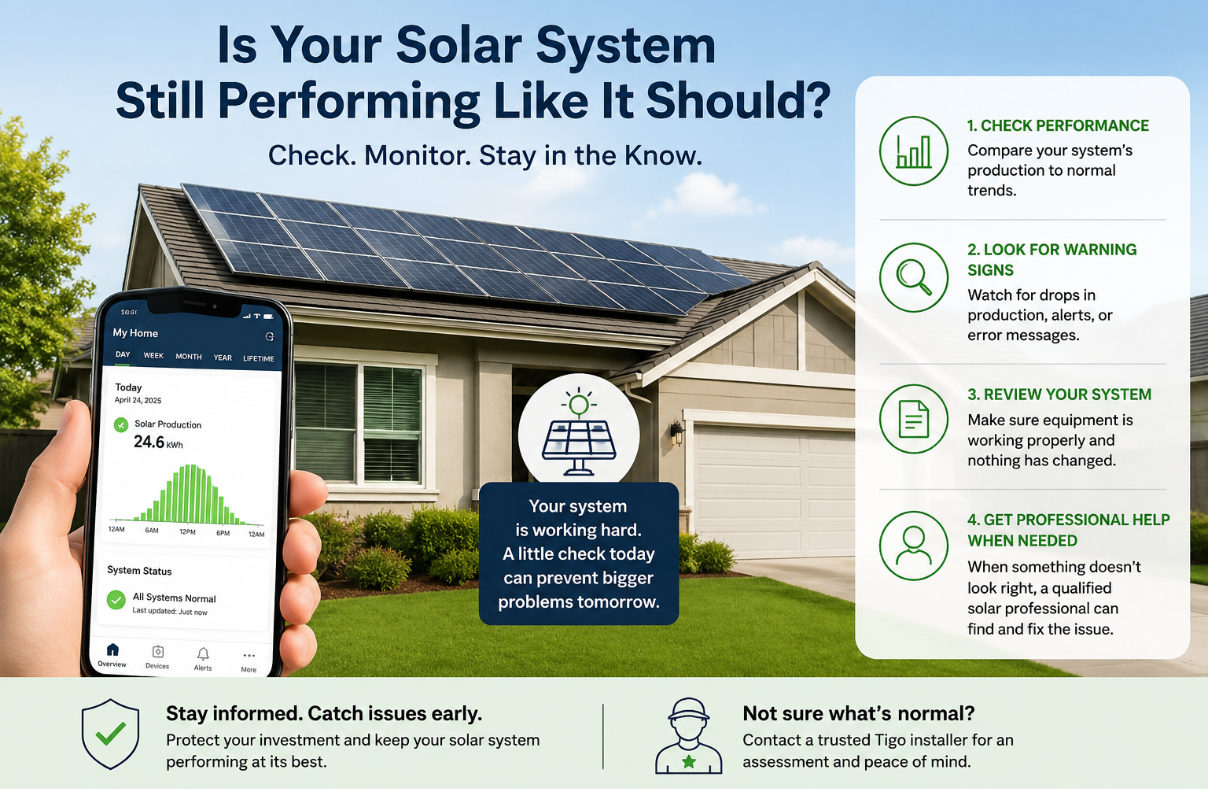
Start with the question: Is my system producing normally for my home?
Solar production changes throughout the year. Weather, season, smoke, shade, and normal module aging can all affect what you see. That means a single cloudy week or one higher utility bill does not automatically mean something is broken.
What matters more is a pattern. If you have access to historical monitoring data, compare similar months or seasons rather than comparing July with December. If you still have your original proposal, it may include expected annual or monthly production that gives you another reference point. Treat those numbers as a baseline, not a guarantee; your home, utility rates, energy use, weather, and site conditions can change over time.
The U.S. Department of Energy (DOE) recommends looking at system production data when evaluating an existing solar system and notes that monitoring information can help identify meaningful changes over time.
Helpful resource: U.S. Department of Energy guidance on operating and maintaining existing PV systems
Five signals worth paying attention to
1. Your monitoring is offline or no longer makes sense
Monitoring is often the easiest way to know whether a solar system is behaving normally. If the app has stopped reporting for weeks or months, do not automatically assume the solar stopped producing, but do not ignore the gap either. A communication problem can be separate from an energy-production problem, and an installer can help determine which one you have.
With compatible Tigo equipment, the Tigo Energy Intelligence platform can provide system and module-level visibility. That kind of information can help a homeowner and service professional move from “something seems wrong” toward a more specific place to investigate.
Learn more: Tigo Energy Intelligence
2. Production dropped and stayed lower
A sustained change is more important than a single low-production day. If the system has historical data, look for a noticeable shift that persists when you compare similar seasons. Write down when you first noticed the change. If there was a storm, roof work, utility outage, internet change, or other event around the same time, note that too.
3. Your inverter is showing alerts, warning lights, or repeated shutdowns
The inverter is a central part of many home solar systems. If it repeatedly shuts down, displays error messages, or appears to stop producing during normal sunny conditions, it deserves professional attention. Do not open the inverter or electrical equipment yourself.
The inverter may be the issue: Read: Is It Time to Replace Your Solar Inverter?
4. The roof or shade around the system has changed
Your solar system is attached to a home that changes over time. Trees grow. New buildings appear nearby. Roofs age. Roofing work, leaks, pests, leaves, debris, or storm damage can change the conditions around the array. The Department of Energy encourages homeowners to consider roof condition and shade when evaluating rooftop solar; those same considerations still matter years after installation.
5. Your electricity use and your solar production no longer tell the same story
A rising electricity bill can be a clue, but it is not proof of a solar problem. You may be using more energy because of an EV, a heat pump, a new family member, working from home, or changing utility rates. Compare the bill with the solar monitoring data. If your household use increased while solar production stayed steady, the system may be fine. If solar production also dropped, that is more useful information to bring to an installer.
What should you gather before calling a solar professional?
A homeowner can make the service visit much more productive without touching any electrical equipment. Before the appointment, gather whatever you have:
- Monitoring screenshots or production history
- Any inverter error codes or alerts
- The date you first noticed the change
- Recent utility bills
- Original proposal or system design documents
- Equipment brand and model information, if easy to find safely
- Warranty information
- Notes about recent roof work, storms, internet changes, tree growth, or other changes around the home
This is where the homeowner journey connects directly with the installer workflow. You provide the symptoms and history; the installer performs the assessment, verifies the cause, and determines what the system actually needs.
What if the company that installed my solar is gone?
That can feel unsettling, but it does not mean you are stuck. Your original installer is a useful first call if they are available because they know the original design. If they are no longer in business, no longer service your area, or will not work on the system, another qualified solar professional may be able to evaluate it.
Think about it the way you would think about other systems in your home. The plumber who services your house today may not be the plumber who installed the original pipes. The important questions are whether the professional is qualified, whether they understand the equipment and local requirements, and whether you trust the repair or upgrade they recommend.
The assessment tells you what comes next
A professional evaluation should separate the symptom from the cause. What looks like an inverter problem to a homeowner might be a monitoring issue, wiring problem, shade change, failed component, or another condition. Once the cause is understood, the next step becomes much clearer.
That next step may be to restore the system with a focused repair. It may make sense to improve monitoring or add module-level visibility. Or, if major equipment needs replacement, it may be worth considering a broader repowering plan that prepares the system for future needs such as battery storage.
The homeowner’s job is not to diagnose the electrical system.
Your job is to notice, document, and ask good questions. The installer’s job is to test, diagnose, and recommend the right path.
What to do next
If your system seems healthy, keep an eye on it and make monitoring part of normal home ownership. If something has changed, do not wait for the system to fail completely before asking for help.
Continue learning: Read: How to Maintain Your Home Solar System Without Becoming a Solar Technician
Need a professional assessment? Find a Tigo installer
Want to understand your upgrade options first? Read: When Your Solar System Stops Working: A Homeowner’s Guide to Repairing, Upgrading, and Repowering
